Complete RHEED Simulation: From Ewald Sphere to CTR Rods
This guide provides a complete walkthrough of simulating RHEED patterns from first principles using the ewald_simulator. We use Si(111) as a concrete example to illustrate the physics at each step.
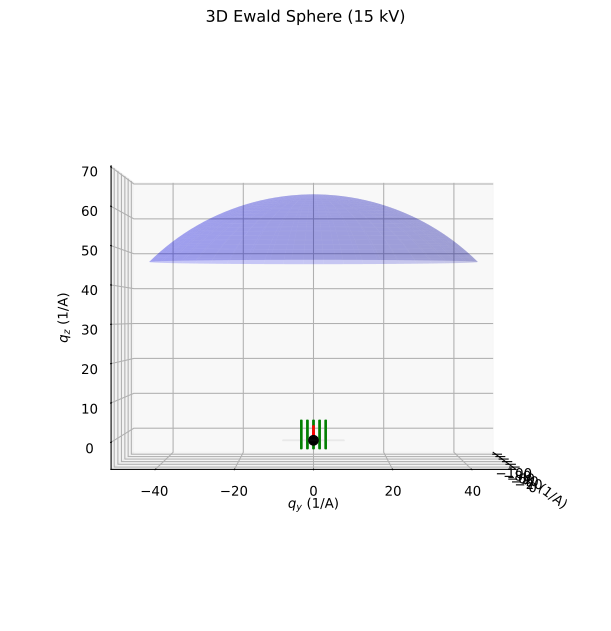
Front view of the Ewald sphere construction in 3D reciprocal space, showing the geometric relationship between the incident wavevector, crystal truncation rods, and diffraction condition.
Overview: Why Surface Diffraction is Different
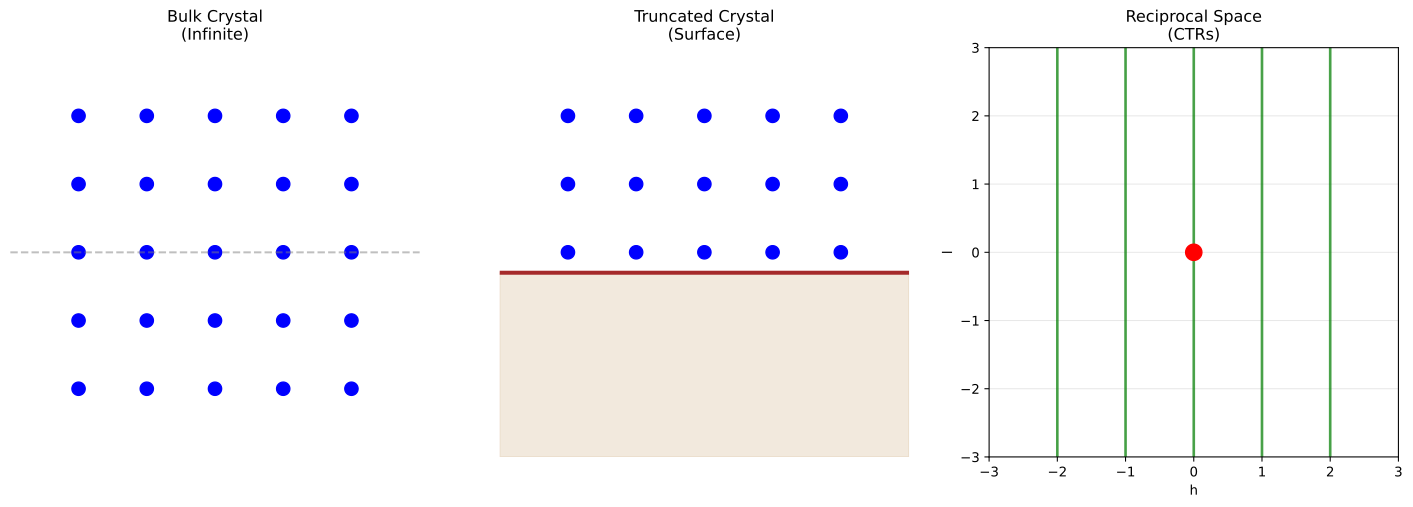
In bulk X-ray diffraction, the crystal is periodic in all three dimensions, producing discrete Bragg peaks at reciprocal lattice points \((h, k, l)\) where all indices are integers.
In RHEED (surface diffraction), the crystal is truncated at the surface:
Periodicity is preserved in-plane (x, y directions)
Periodicity is broken along the surface normal (z direction)
This truncation transforms discrete Bragg peaks into continuous rods of intensity extending perpendicular to the surface—the Crystal Truncation Rods (CTRs).
Visualizing bulk vs surface reciprocal space:
import matplotlib.pyplot as plt

fig, axes = plt.subplots(1, 2, figsize=(12, 5))

# Left: Bulk diffraction (discrete points)
ax1 = axes[0]
for h in range(-2, 3):
    for l in range(-2, 3):
        ax1.scatter(h, l, c="blue", s=100)
ax1.set_xlabel("h", fontsize=12)
ax1.set_ylabel("l", fontsize=12)
ax1.set_title("Bulk Diffraction\n(Discrete Bragg peaks)", fontsize=14)
ax1.set_xlim(-3, 3)
ax1.set_ylim(-3, 3)
ax1.grid(True, alpha=0.3)

# Right: Surface diffraction (continuous rods)
ax2 = axes[1]
for h in range(-2, 3):
    ax2.axvline(h, color="green", linewidth=3, alpha=0.7)
ax2.set_xlabel("h", fontsize=12)
ax2.set_ylabel("l (continuous)", fontsize=12)
ax2.set_title("Surface Diffraction (RHEED)\n(Crystal Truncation Rods)", fontsize=14)
ax2.set_xlim(-3, 3)
ax2.set_ylim(-3, 3)
ax2.grid(True, alpha=0.3)

plt.tight_layout()
plt.savefig("bulk_vs_surface.png", dpi=150)
The Physics Step by Step
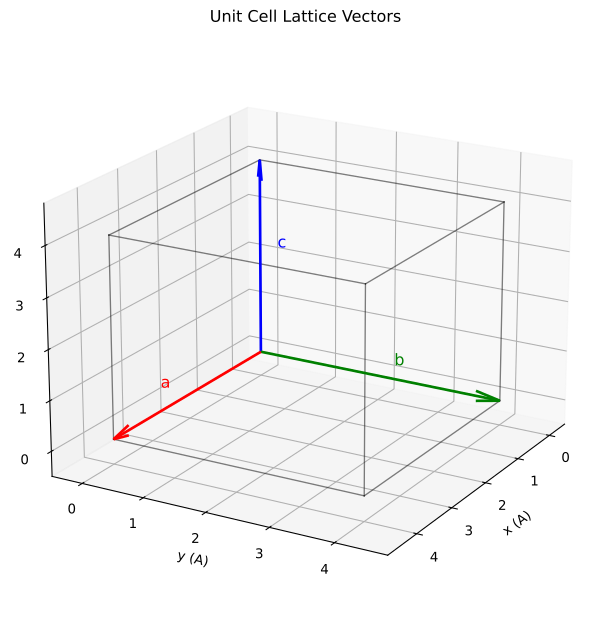
Lattice vector construction for a cubic unit cell. The Si diamond structure is built on this cubic lattice with a two-atom basis.
Step 1: Define the Crystal Structure
Si has a diamond cubic structure with lattice constant \(a = 5.431\) Å. The conventional unit cell contains 8 atoms at positions:
Atom |
Fractional Coordinates |
|---|---|
1 |
(0.00, 0.00, 0.00) |
2 |
(0.25, 0.25, 0.25) |
3 |
(0.50, 0.50, 0.00) |
4 |
(0.75, 0.75, 0.25) |
5 |
(0.50, 0.00, 0.50) |
6 |
(0.75, 0.25, 0.75) |
7 |
(0.00, 0.50, 0.50) |
8 |
(0.25, 0.75, 0.75) |
import jax.numpy as jnp
import rheedium as rh
from rheedium.types import create_crystal_structure

# Si lattice constant
a_si = 5.431  # Angstroms

# Diamond structure fractional positions
frac_coords = jnp.array([
    [0.00, 0.00, 0.00],
    [0.25, 0.25, 0.25],
    [0.50, 0.50, 0.00],
    [0.75, 0.75, 0.25],
    [0.50, 0.00, 0.50],
    [0.75, 0.25, 0.75],
    [0.00, 0.50, 0.50],
    [0.25, 0.75, 0.75],
])

# Convert to Cartesian
cart_coords = frac_coords * a_si

# Si atomic number = 14
atomic_numbers = jnp.full(8, 14.0)

# Create crystal structure
si_crystal = create_crystal_structure(
    frac_positions=jnp.column_stack([frac_coords, atomic_numbers]),
    cart_positions=jnp.column_stack([cart_coords, atomic_numbers]),
    cell_lengths=jnp.array([a_si, a_si, a_si]),
    cell_angles=jnp.array([90.0, 90.0, 90.0]),
)
Step 2: Construct the Reciprocal Lattice
For a cubic crystal with lattice constant \(a\), the reciprocal lattice vectors are:
For Si with \(a = 5.431\) Å:
Any reciprocal lattice vector is:
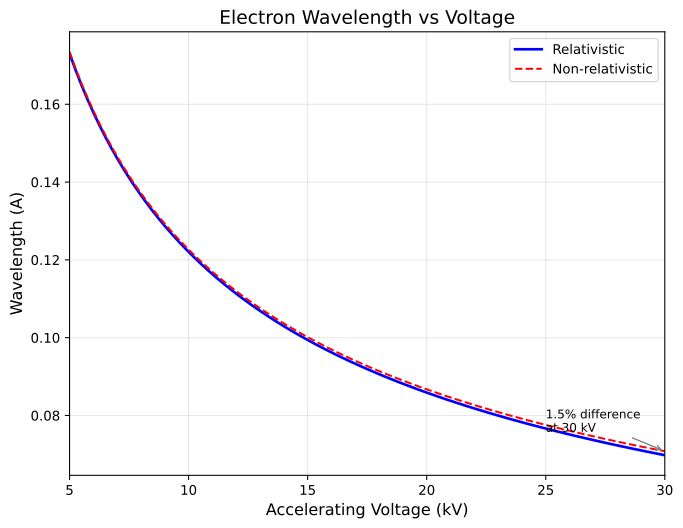
Electron wavelength as a function of accelerating voltage. Higher voltages produce shorter wavelengths and larger Ewald sphere radii, affecting the diffraction geometry.
Step 3: Calculate the Electron Wavelength and Wavevector
For electrons accelerated through voltage \(V\) (in kV), the relativistic de Broglie wavelength is:
For 20 kV electrons:
The wavevector magnitude is:
This is much larger than the reciprocal lattice spacing (1.157 Å⁻¹), which is why the Ewald sphere is nearly flat in RHEED geometry.
Step 4: Build the Incident Wavevector
The electron beam arrives at grazing angle \(\theta\) (typically 1–5°) with azimuthal angle \(\phi\):
For \(\theta = 2°\), \(\phi = 0°\), and \(|\mathbf{k}| = 73.2\) Å⁻¹:
The negative z-component indicates the beam is traveling downward toward the surface.
Step 5: Construct the Ewald Sphere
The Ewald sphere is a sphere in reciprocal space:
Center: At the tip of \(-\mathbf{k}_{\text{in}}\), i.e., at \((−73.16, 0, +2.55)\)
Radius: \(|\mathbf{k}| = 73.2\) Å⁻¹
The diffraction condition is that the outgoing wavevector \(\mathbf{k}_{\text{out}}\) must:
Start from the Ewald sphere center
End on a reciprocal lattice point (for bulk) or rod (for surface)
Have magnitude equal to \(|\mathbf{k}_{\text{in}}|\) (elastic scattering)
Visualizing the Ewald sphere construction:
from rheedium.plots import plot_ewald_sphere_2d
import matplotlib.pyplot as plt

# 2D cross-section of Ewald sphere with CTR rods
fig, ax = plt.subplots(figsize=(12, 8))
plot_ewald_sphere_2d(
    voltage_kv=20.0,       # 20 keV electrons
    theta_deg=2.0,         # 2° grazing angle
    lattice_spacing=5.431, # Si lattice constant
    n_rods=9,              # Show 9 rods
    ax=ax,
)
plt.savefig("ewald_construction.png", dpi=150)

The figure shows:
Blue curve: Ewald sphere cross-section (radius = \(|k| = 2\pi/\lambda\))
Green lines: CTR rods at each \((h,0)\) position
Red arrow: Incident wavevector \(\mathbf{k}_{in}\) at grazing angle
Origin: Where the beam “hits” in reciprocal space
Step 6: Find CTR-Ewald Intersections
For each \((h, k)\) rod extending along the \(\mathbf{c}^*\) direction, we solve for the \(l\) value where the rod intersects the Ewald sphere.
The outgoing wavevector along the rod is:
The elastic scattering condition \(|\mathbf{k}_{\text{out}}| = |\mathbf{k}_{\text{in}}|\) gives:
Expanding this quadratic in \(l\):
where:
The solution is:
Physical constraints on valid solutions:
Real solution: Discriminant \(b^2 - 4ac \geq 0\) (rod actually intersects sphere)
Upward scattering: \(k_{\text{out},z} > 0\) (beam scatters toward detector above sample)
The find_ctr_ewald_intersection function implements this:
from rheedium.simul.simulator import find_ctr_ewald_intersection

# Example: Find intersection for (1,0) rod
l_intersect, k_out, valid = find_ctr_ewald_intersection(
    h=1,
    k=0,
    k_in=k_in,
    recip_a=recip_a,
    recip_b=recip_b,
    recip_c=recip_c,
)

if valid > 0.5:
    print(f"(1,0) rod intersects Ewald sphere at l = {l_intersect:.3f}")
    print(f"k_out = {k_out}")
Step 7: Calculate Diffracted Intensities
At each valid intersection point \((h, k, l)\), the diffracted intensity includes:
Structure Factor
where:
\(f_j(q)\) = atomic form factor for atom \(j\) at momentum transfer \(q = |\mathbf{k}_{\text{out}} - \mathbf{k}_{\text{in}}|\)
\(\mathbf{r}_j\) = position of atom \(j\)
Rheedium uses Kirkland parameterization for accurate electron form factors.
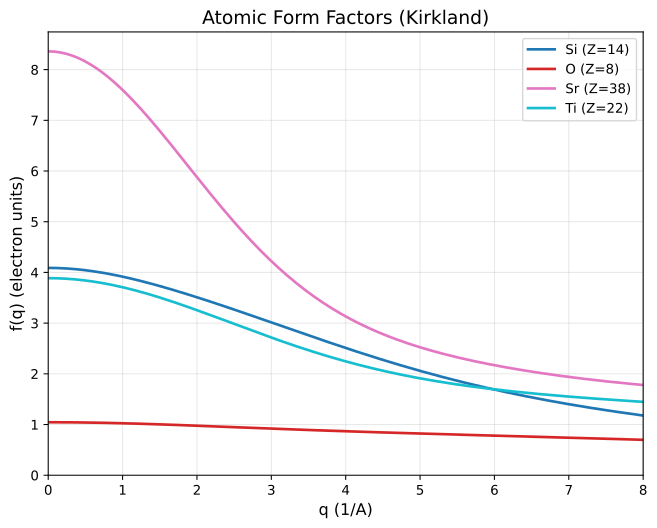
Kirkland electron atomic form factors for different elements. The form factor determines how strongly each atom type scatters electrons as a function of momentum transfer.
Debye-Waller Factor
Thermal vibrations reduce intensity:
where \(B = 8\pi^2 \langle u^2 \rangle\) is the temperature factor.
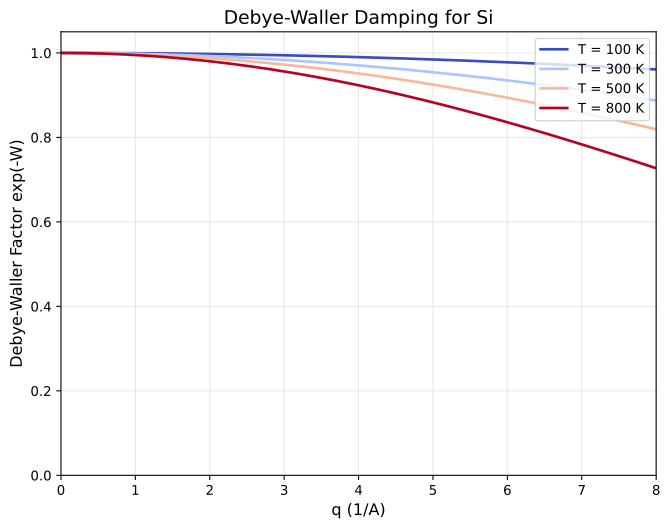
Debye-Waller thermal damping factor at different temperatures. Higher temperatures increase atomic vibrations, reducing diffracted intensity especially at large momentum transfer.
CTR Modulation
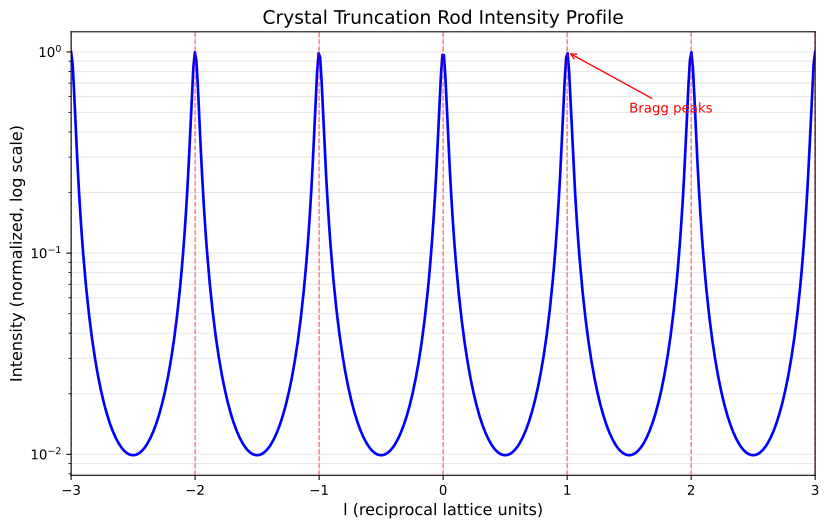
The surface truncation creates intensity modulation along the rod:
This diverges at integer \(l\) (bulk Bragg peaks) and has minima at half-integer \(l\) (anti-Bragg condition).
Visualizing the CTR intensity profile:
from rheedium.plots import plot_ctr_profile
import matplotlib.pyplot as plt

fig, ax = plt.subplots(figsize=(10, 6))
plot_ctr_profile(l_range=(-2.0, 2.0), n_points=500, ax=ax)
plt.savefig("ctr_profile.png", dpi=150)
Surface Roughness Damping
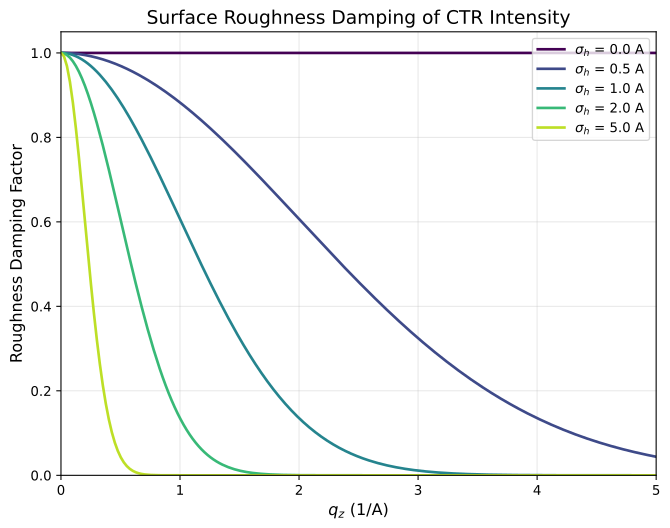
RMS roughness \(\sigma\) reduces intensity at high \(q_z\):
Visualizing roughness effects:
from rheedium.plots import plot_roughness_damping
import matplotlib.pyplot as plt

fig, ax = plt.subplots(figsize=(8, 6))
plot_roughness_damping(
    q_z_range=(0.0, 5.0),
    sigma_values=[0.0, 0.5, 1.0, 2.0],
    ax=ax,
)
plt.savefig("roughness.png", dpi=150)
Total Intensity
where \(\epsilon \approx 0.01\) regularizes the divergence at integer \(l\).
Step 8: Project onto Detector
The diffracted beams are projected onto a phosphor screen at distance \(d\) from the sample:
This ray-tracing projection maps each \(\mathbf{k}_{\text{out}}\) to a point on the detector screen.
Complete Example: Si(111) RHEED Simulation
import jax.numpy as jnp
import rheedium as rh
from rheedium.simul import ewald_simulator
from rheedium.types import create_crystal_structure

# 1. Create Si(111) crystal structure
a_si = 5.431

frac_coords = jnp.array([
    [0.00, 0.00, 0.00],
    [0.25, 0.25, 0.25],
    [0.50, 0.50, 0.00],
    [0.75, 0.75, 0.25],
    [0.50, 0.00, 0.50],
    [0.75, 0.25, 0.75],
    [0.00, 0.50, 0.50],
    [0.25, 0.75, 0.75],
])

cart_coords = frac_coords * a_si
atomic_numbers = jnp.full(8, 14.0)

si_crystal = create_crystal_structure(
    frac_positions=jnp.column_stack([frac_coords, atomic_numbers]),
    cart_positions=jnp.column_stack([cart_coords, atomic_numbers]),
    cell_lengths=jnp.array([a_si, a_si, a_si]),
    cell_angles=jnp.array([90.0, 90.0, 90.0]),
)

# 2. Run the Ewald simulator
pattern = ewald_simulator(
    crystal=si_crystal,
    voltage_kv=20.0,           # 20 keV electrons
    theta_deg=2.0,             # 2° grazing incidence
    phi_deg=0.0,               # Beam along [100] azimuth
    hmax=5,                    # h indices from -5 to +5
    kmax=5,                    # k indices from -5 to +5
    detector_distance=1000.0,  # 1 meter to detector
    temperature=300.0,         # Room temperature
    surface_roughness=0.5,     # 0.5 Å RMS roughness
)

# 3. Analyze results
valid_mask = pattern.G_indices >= 0
n_valid = jnp.sum(valid_mask)

print(f"Found {n_valid} valid reflections")
print(f"Detector coordinates range:")
print(f"  x: [{pattern.detector_points[valid_mask, 0].min():.1f}, "
      f"{pattern.detector_points[valid_mask, 0].max():.1f}] mm")
print(f"  y: [{pattern.detector_points[valid_mask, 1].min():.1f}, "
      f"{pattern.detector_points[valid_mask, 1].max():.1f}] mm")

# 4. Visualize
rh.plots.plot_rheed(pattern, grid_size=400)
Understanding the Output
The ewald_simulator returns a RHEEDPattern containing:
Field |
Description |
|---|---|
|
Indices into the (h,k) grid; -1 for invalid |
|
Outgoing wavevectors (N × 3) |
|
Screen coordinates (N × 2) in mm |
|
Normalized intensities |
What the Pattern Shows
The RHEED pattern for Si(111) at \(\phi = 0°\) shows:
Central specular streak at \((h,k) = (0,0)\) — the direct beam reflection
Symmetric streaks at \((\pm 1, 0)\), \((\pm 2, 0)\), etc. — Laue zones
Intensity modulation along each streak — the CTR profile
Streak broadening — finite coherent domain size (if applicable)
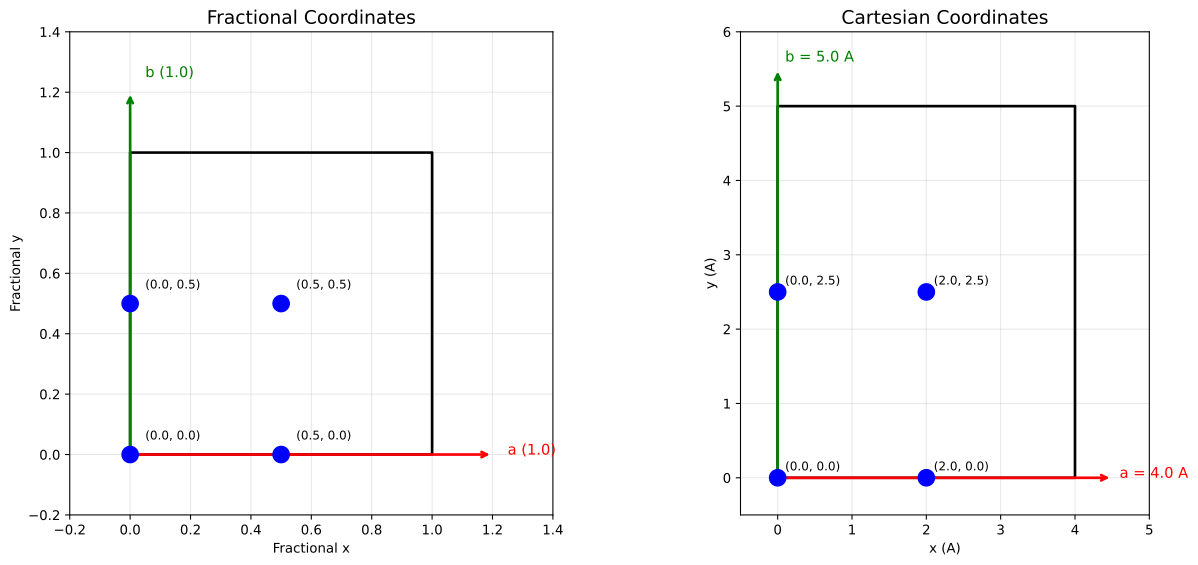
Coordinate systems used in RHEED: real-space crystal coordinates, reciprocal-space diffraction vectors, and detector-plane projection. Understanding these transformations is key to interpreting simulated patterns.
Key Physical Insights
Why Rods Instead of Spots?
The 2D periodicity of the surface means reciprocal lattice “points” become “rods”:
In-plane (h, k): Still quantized by surface lattice
Out-of-plane (l): Continuous due to broken periodicity
Why Grazing Incidence?
At grazing angles:
Surface sensitivity: Electrons penetrate only a few atomic layers
Large Ewald sphere curvature: Sphere appears nearly flat at low \(\theta\)
Streak visibility: Tangent intersection with rods produces elongated features
Why the CTR 1/sin²(πl) Modulation?
The sharp termination of the electron density at the surface creates a step function in real space. The Fourier transform of a step function is \(1/q\), giving the characteristic \(1/\sin^2(\pi l)\) intensity profile along the rod.
Comparison with Bulk-Like Approaches
The older kinematic_simulator treated RHEED like bulk diffraction:
Aspect |
Bulk-like (old) |
CTR-based (new) |
|---|---|---|
l values |
Integer only |
Continuous from Ewald geometry |
Physics |
3D periodic crystal |
Surface truncation |
Intensity |
Structure factor only |
SF × CTR × roughness |
Accuracy |
Incorrect for surfaces |
Physically correct |
Visualizing the 3D Geometry
The full 3D picture shows the Ewald sphere intersecting multiple CTR rods:
from rheedium.plots import plot_ewald_sphere_3d
import matplotlib.pyplot as plt

fig = plt.figure(figsize=(10, 8))
ax = fig.add_subplot(111, projection="3d")
plot_ewald_sphere_3d(
    voltage_kv=20.0,
    theta_deg=2.0,
    phi_deg=0.0,
    lattice_spacing=5.431,  # Si
    n_rods_h=5,
    n_rods_k=5,
    elev=20.0,
    azim=45.0,
    ax=ax,
)
plt.savefig("ewald_3d_si.png", dpi=150)
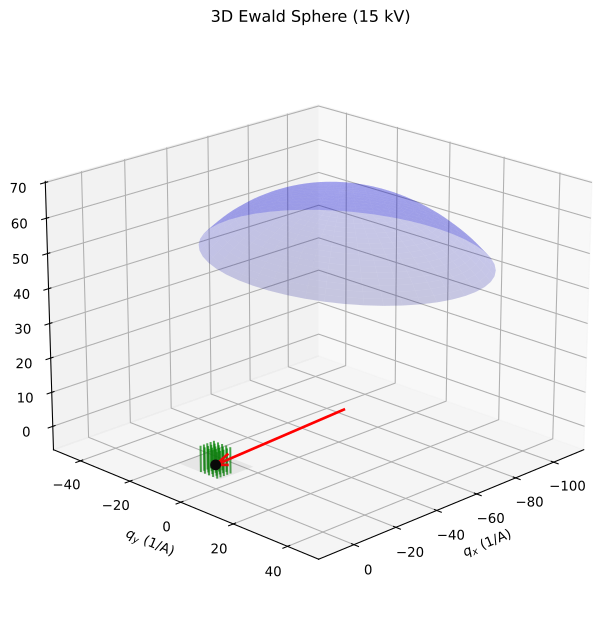
This 3D view shows:
Blue surface: Ewald sphere (partial, upper hemisphere)
Green lines: CTR rods forming a 2D grid, extending along \(q_z\)
Red arrow: Incident wavevector at grazing angle
Gray plane: Surface (z = 0)
Advanced: Azimuthal Dependence
Rotating \(\phi\) changes which in-plane periodicities the beam probes:
# Scan azimuthal angle from 0° to 90°
for phi in [0, 15, 30, 45, 60, 75, 90]:
    pattern = ewald_simulator(
        crystal=si_crystal,
        voltage_kv=20.0,
        theta_deg=2.0,
        phi_deg=float(phi),
        hmax=5, kmax=5,
    )

    valid_count = jnp.sum(pattern.G_indices >= 0)
    print(f"phi = {phi}°: {valid_count} valid reflections")
Different azimuths reveal different symmetry elements:
\(\phi = 0°\) (along [100]): Shows 2-fold symmetry
\(\phi = 45°\) (along [110]): Different streak spacing
\(\phi = 90°\) (along [010]): Equivalent to 0° for cubic
Visualizing the RHEED Pattern
The ultimate output of rheedium is a simulated RHEED pattern. The plot_rheed function renders the diffraction spots with realistic broadening:
import rheedium as rh
import matplotlib.pyplot as plt

# Using the pattern from our Si(111) simulation
fig, ax = plt.subplots(figsize=(10, 8))
rh.plots.plot_rheed(
    pattern,
    grid_size=400,        # Image resolution
    spot_width=0.03,      # Gaussian broadening (smaller = sharper)
    cmap_name="phosphor", # Green phosphor screen colormap
    ax=ax,
)
ax.set_title("Si(111) RHEED Pattern — φ = 0°, θ = 2°", fontsize=14)
plt.savefig("si_rheed_pattern.png", dpi=150, bbox_inches="tight")
plt.show()
Comparing Different Azimuths
The pattern changes dramatically with azimuthal angle. Here’s how to visualize multiple orientations:
import matplotlib.pyplot as plt

fig, axes = plt.subplots(1, 3, figsize=(15, 5))
azimuths = [0, 30, 45]

for ax, phi in zip(axes, azimuths):
    pattern = ewald_simulator(
        crystal=si_crystal,
        voltage_kv=20.0,
        theta_deg=2.0,
        phi_deg=float(phi),
        hmax=5, kmax=5,
        detector_distance=1000.0,
        temperature=300.0,
        surface_roughness=0.5,
    )

    rh.plots.plot_rheed(
        pattern,
        grid_size=300,
        spot_width=0.04,
        cmap_name="phosphor",
        ax=ax,
    )
    ax.set_title(f"φ = {phi}°", fontsize=12)

plt.suptitle("Si(111) RHEED Patterns at Different Azimuths", fontsize=14)
plt.tight_layout()
plt.savefig("si_azimuthal_comparison.png", dpi=150, bbox_inches="tight")
plt.show()
What You Should See
The simulated RHEED patterns exhibit the key features expected from surface diffraction:
Feature |
Physical Origin |
|---|---|
Vertical streaks |
CTR rods intersecting Ewald sphere |
Streak spacing |
In-plane reciprocal lattice spacing |
Intensity variation along streaks |
CTR modulation \(\propto 1/\sin^2(\pi l)\) |
Central bright streak |
Specular reflection (0,0) rod |
Laue zones |
Higher-order diffraction from (±h, 0) rods |
Streak broadening |
Finite domain size, beam divergence |
Effect of Surface Roughness
Surface roughness damps high-\(q_z\) intensity. Compare smooth vs rough surfaces:
fig, axes = plt.subplots(1, 2, figsize=(12, 5))

for ax, roughness in zip(axes, [0.0, 2.0]):
    pattern = ewald_simulator(
        crystal=si_crystal,
        voltage_kv=20.0,
        theta_deg=2.0,
        phi_deg=0.0,
        hmax=5, kmax=5,
        detector_distance=1000.0,
        temperature=300.0,
        surface_roughness=roughness,
    )

    rh.plots.plot_rheed(pattern, grid_size=300, ax=ax)
    ax.set_title(f"σ = {roughness} Å", fontsize=12)

plt.suptitle("Effect of Surface Roughness on RHEED Pattern", fontsize=14)
plt.tight_layout()
plt.savefig("roughness_comparison.png", dpi=150, bbox_inches="tight")
plt.show()
The rough surface pattern shows:
Weaker intensity at the top of the screen (high \(q_z\))
Relatively unchanged intensity near the shadow edge (low \(q_z\))
This is exactly the \(\exp(-\sigma^2 q_z^2)\) damping predicted by theory
Summary
The ewald_simulator correctly implements RHEED physics by:
Building the Ewald sphere from beam voltage and geometry
Solving the quadratic intersection for each \((h, k)\) CTR rod
Computing the continuous \(l\) value at each intersection
Calculating intensities with proper structure factors, CTR modulation, and roughness
Projecting onto the detector for visualization
This approach produces physically accurate RHEED patterns that correctly represent surface diffraction phenomena.
Key Source Files
simul/simulator.py—ewald_simulatorandfind_ctr_ewald_intersectionsimul/form_factors.py— Kirkland atomic form factorssimul/surface_rods.py— CTR intensity calculationssimul/simul_utils.py— Wavelength and wavevector utilities