Controlling Layer Contributions in RHEED Simulations
RHEED is inherently surface-sensitive due to the grazing incidence geometry. This guide covers the different approaches available in rheedium for controlling which atomic layers contribute to the simulated diffraction pattern.
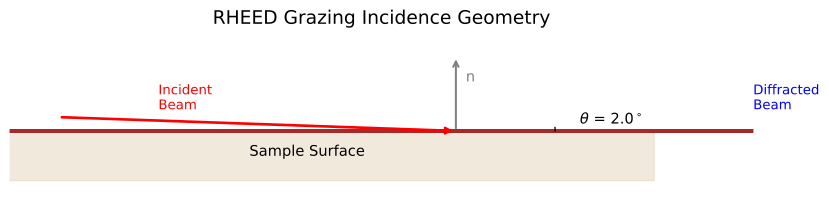
RHEED geometry showing electrons arriving at grazing angle, which limits penetration depth and makes the technique highly surface-sensitive. Layer control determines which atoms contribute to the simulated diffraction pattern.
Why Layer Control Matters
In RHEED, electrons penetrate only a few nanometers into the surface due to:
Grazing incidence: Path length through material is extended
Strong electron-matter interaction: High scattering cross-section
Absorption: Inelastic scattering removes electrons from coherent beam
The effective sampling depth depends on material, voltage, and incidence angle. Controlling which layers contribute to your simulation affects:
Surface atom thermal factors (enhanced Debye-Waller)
CTR (Crystal Truncation Rod) calculations
Overall intensity distribution
Approach 1: Surface Fraction (Simple)
The simplest approach uses a single parameter to define what fraction of atoms (by z-height) are considered “surface” atoms.
Usage
import rheedium as rh

crystal = rh.inout.parse_cif("structure.cif")

pattern = rh.simul.kinematic_simulator(
    crystal=crystal,
    voltage_kv=20.0,
    theta_deg=2.0,
    surface_fraction=0.3,  # Top 30% of atoms are "surface"
)
What It Does
Atoms in the top 30% by z-coordinate get enhanced thermal vibrations
These atoms have larger Debye-Waller damping factors
All atoms still contribute to the structure factor calculation
When to Use
Quick simulations where precise layer control isn’t critical
When you don’t know the exact layer structure
As a starting point before refining with more specific methods
Approach 2: SurfaceConfig (Flexible)
SurfaceConfig provides multiple strategies for identifying surface atoms.
Available Methods
Method |
Description |
Best For |
|---|---|---|
|
Top fraction by z-coordinate |
General surfaces |
|
Topmost N complete layers |
Well-defined layer structures |
|
Atoms with fewer neighbors |
Stepped surfaces, defects |
|
User-provided boolean mask |
Full control |
Height-Based Selection
from rheedium.types import SurfaceConfig

config = SurfaceConfig(
    method="height",
    height_fraction=0.2,  # Top 20% by z-coordinate
)

pattern = rh.simul.kinematic_simulator(
    crystal=crystal,
    surface_config=config,
    ...
)
Layer-Based Selection
For crystals with well-defined layers (e.g., perovskites, layered materials):
config = SurfaceConfig(
    method="layers",
    n_layers=3,  # Top 3 complete atomic layers
)
This is more physically meaningful than height fraction because it respects the crystal’s natural layer structure.
Coordination-Based Selection
For surfaces with steps, terraces, or point defects:
config = SurfaceConfig(
    method="coordination",
    coordination_cutoff=3.0,  # Neighbor search radius in Angstroms
)
Atoms with fewer neighbors than bulk coordination are identified as surface atoms. This naturally captures:
Step edges
Kink sites
Adatoms
Vacancies at the surface
Explicit Mask
For complete control, provide a boolean array:
import jax.numpy as jnp

# Create custom mask (True = surface atom)
n_atoms = crystal.cart_positions.shape[0]
my_mask = jnp.zeros(n_atoms, dtype=bool)
my_mask = my_mask.at[-10:].set(True)  # Last 10 atoms are surface

config = SurfaceConfig(
    method="explicit",
    explicit_mask=my_mask,
)
Approach 3: Pre-Filtering with atom_scraper
For more drastic control, filter atoms before simulation using atom_scraper.
Usage
import jax.numpy as jnp
from rheedium.ucell import atom_scraper

# Original crystal
crystal = rh.inout.parse_cif("bulk_structure.cif")

# Keep only atoms within 15 Angstroms of the surface
filtered = atom_scraper(
    crystal=crystal,
    zone_axis=jnp.array([0.0, 0.0, 1.0]),   # Surface normal direction
    thickness=jnp.array([0.0, 0.0, 15.0]),  # 15 Angstrom depth
)

# Simulate with filtered crystal
pattern = rh.simul.kinematic_simulator(
    crystal=filtered,
    ...
)
Key Differences from SurfaceConfig
Feature |
SurfaceConfig |
atom_scraper |
|---|---|---|
Removes atoms |
No |
Yes |
Affects structure factor |
Only via DW factors |
Yes, directly |
Changes unit cell |
No |
Yes (adjusts cell height) |
Reversible |
Yes |
No (need original crystal) |
When to Use
When you want to exclude bulk atoms entirely
Simulating very thin films or 2D materials
When CTR contributions from deep layers aren’t relevant
Creating surface slab models from bulk structures
Arbitrary Surface Orientations
atom_scraper works with any zone axis, enabling non-(001) surfaces:
# (111) surface - filter along [111] direction
filtered_111 = atom_scraper(
    crystal=crystal,
    zone_axis=jnp.array([1.0, 1.0, 1.0]),
    thickness=jnp.array([10.0, 10.0, 10.0]),
)

# (110) surface
filtered_110 = atom_scraper(
    crystal=crystal,
    zone_axis=jnp.array([1.0, 1.0, 0.0]),
    thickness=jnp.array([10.0, 10.0, 0.0]),
)
Approach 4: bulk_to_slice for Surface Reorientation
For simulating RHEED from non-(001) surfaces, use bulk_to_slice to reorient the crystal:
from rheedium.types import bulk_to_slice

# Create (111)-oriented surface slab
slab_111 = bulk_to_slice(
    bulk_crystal=crystal,
    orientation=jnp.array([1, 1, 1]),  # Miller indices of surface
    depth=20.0,  # Slab thickness in Angstroms
)

# Now simulate - the slab has (111) as the surface plane
pattern = rh.simul.kinematic_simulator(
    crystal=slab_111,
    voltage_kv=20.0,
    theta_deg=2.0,
)
Combining Approaches
These methods can be combined for fine-grained control:
# 1. Reorient to (110) surface
slab = bulk_to_slice(
    bulk_crystal=crystal,
    orientation=jnp.array([1, 1, 0]),
    depth=30.0,
)

# 2. Filter to top 15 Angstroms
filtered_slab = atom_scraper(
    crystal=slab,
    zone_axis=jnp.array([0.0, 0.0, 1.0]),
    thickness=jnp.array([0.0, 0.0, 15.0]),
)

# 3. Apply layer-based surface identification
config = SurfaceConfig(method="layers", n_layers=2)

# 4. Simulate
pattern = rh.simul.kinematic_simulator(
    crystal=filtered_slab,
    surface_config=config,
    voltage_kv=20.0,
    theta_deg=2.0,
)
Physical Effects of Layer Control
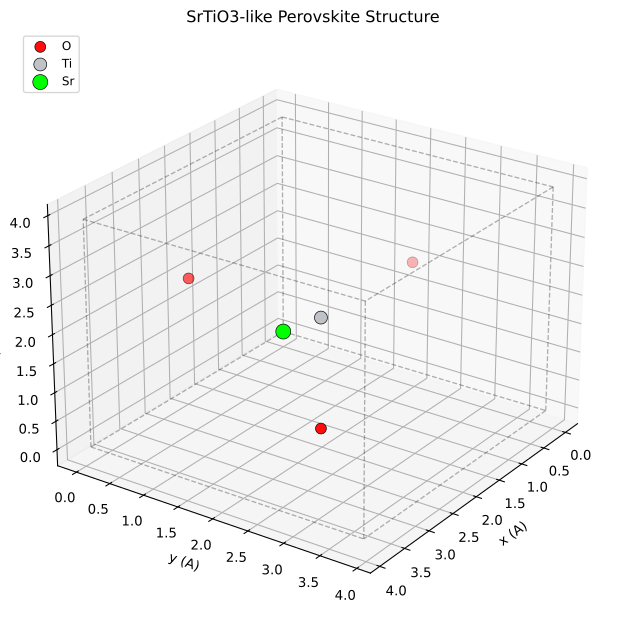
Visualization of a crystal structure showing how surface atoms (top layers) differ from bulk atoms in their environment and thermal behavior.
On Debye-Waller Factors
Surface atoms have enhanced thermal vibrations compared to bulk:
The Debye-Waller factor \(\exp(-W)\) where \(W = \frac{1}{2}q^2\langle u^2\rangle\) is therefore stronger for surface atoms, reducing their scattering contribution at high \(q\).
The temperature dependence of this damping effect:
from rheedium.plots import plot_debye_waller
import matplotlib.pyplot as plt

fig, ax = plt.subplots(figsize=(10, 6))
plot_debye_waller(
    q_range=(0.0, 8.0),
    temperatures=[300.0, 300.0],  # Bulk vs surface-enhanced
    atomic_number=14,
    surface_enhancement=[1.0, 1.5],  # Bulk (1.0) vs surface (1.5x)
    ax=ax,
)
plt.savefig("surface_debye_waller.png", dpi=150, bbox_inches="tight")
plt.show()
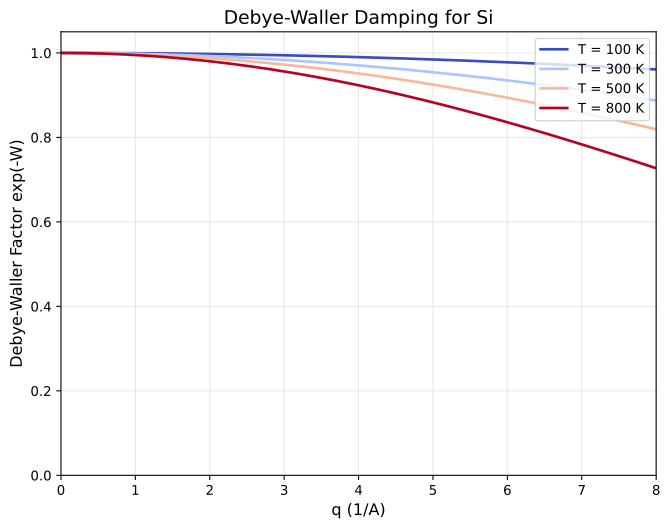
Debye-Waller damping factor for bulk vs surface atoms. Surface atoms with enhanced thermal vibrations show stronger intensity reduction at high momentum transfer.
On CTR Intensities
Crystal Truncation Rods arise from the abrupt termination of the crystal. The surface structure factor enters the CTR calculation:
Changing which atoms are “surface” modifies \(F_{\text{surface}}\) and thus the CTR profile:
from rheedium.plots import plot_ctr_profile
import matplotlib.pyplot as plt

fig, ax = plt.subplots(figsize=(12, 6))
plot_ctr_profile(
    l_range=(-2.5, 2.5),
    n_points=500,
    ax=ax,
)
plt.savefig("ctr_profile.png", dpi=150, bbox_inches="tight")
plt.show()
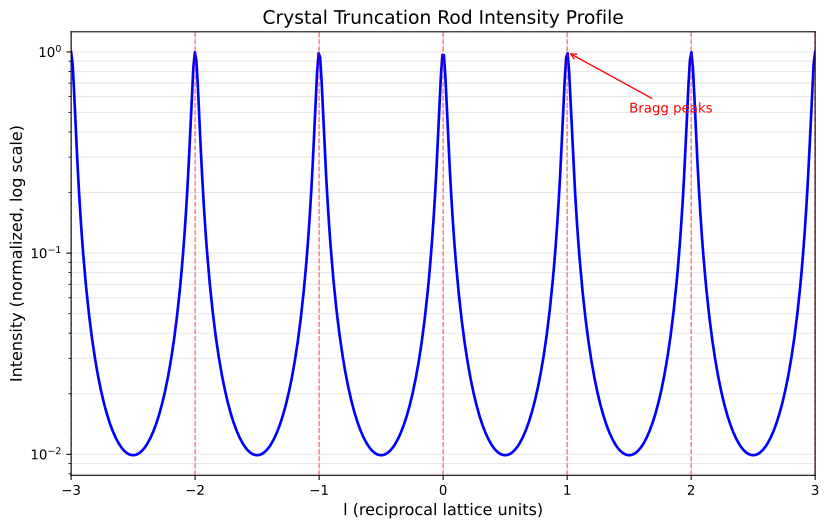
Crystal Truncation Rod intensity profile showing the characteristic \(1/\sin^2(\pi l)\) modulation. Intensity diverges at integer \(l\) (Bragg peaks) and has minima at half-integer \(l\) (anti-Bragg condition).
On Pattern Symmetry
Different surface selections can break or preserve symmetry:
Height-based: Preserves in-plane symmetry
Coordination-based: May break symmetry at step edges
Explicit mask: User controls symmetry
Quick Reference
Goal |
Method |
Code |
|---|---|---|
Simple surface definition |
|
|
Layer-aware selection |
|
|
Step/defect surfaces |
|
|
Remove bulk atoms |
|
|
Non-(001) surfaces |
|
|
Full control |
Explicit mask |
|
Visualizing Layer Control Effects
Layer selection directly impacts the RHEED pattern. Here’s how different layer configurations affect the diffraction:
import rheedium as rh

# Load crystal structure
crystal = rh.io.parse_cif("SrTiO3.cif")

# Compare different surface depths
fractions = [0.1, 0.3, 0.5]

for frac in fractions:
    pattern = rh.simul.kinematic_simulator(
        crystal,
        voltage_kv=15.0,
        theta_deg=2.0,
        hmax=5,
        kmax=5,
        surface_fraction=frac,
        surface_roughness=0.3,
    )
    rh.plots.plot_rheed(pattern, cmap_name="phosphor")
RHEED patterns showing how surface_fraction controls the depth of atoms contributing to diffraction. Smaller fractions (surface-sensitive) show enhanced surface reconstruction features, while larger fractions include more bulk contributions.
Layer-Based vs. Height-Based Selection
import rheedium as rh
from rheedium.types.rheed_types import SurfaceConfig

crystal = rh.io.parse_cif("SrTiO3.cif")

# Default selection (uses surface_fraction)
pattern_default = rh.simul.ewald_simulator(
    crystal,
    voltage_kv=15.0,
    theta_deg=2.0,
    hmax=5,
    kmax=5,
    surface_roughness=0.3,
)
rh.plots.plot_rheed(pattern_default, cmap_name="phosphor")

# Layer-based selection (uses SurfaceConfig)
config = SurfaceConfig(method="layers", n_layers=2)
pattern_layers = rh.simul.ewald_simulator(
    crystal,
    voltage_kv=15.0,
    theta_deg=2.0,
    hmax=5,
    kmax=5,
    surface_config=config,
    surface_roughness=0.3,
)
rh.plots.plot_rheed(pattern_layers, cmap_name="phosphor")
Comparison of surface atom selection methods. Height-based selection (left) uses a continuous depth cutoff, while layer-based selection (right) preserves complete atomic layers, maintaining stoichiometry for multi-element crystals.
Key Source Files
types/rheed_types.py-SurfaceConfigandidentify_surface_atomsucell/unitcell.py-atom_scrapertypes/crystal_types.py-bulk_to_slicesimul/simulator.py-kinematic_simulatorwith surface options